Anatomy of a startup cloud bill: $760 to $170 in a weekend

Joseph Emmanuel (iemarjay)
21st May, 2026
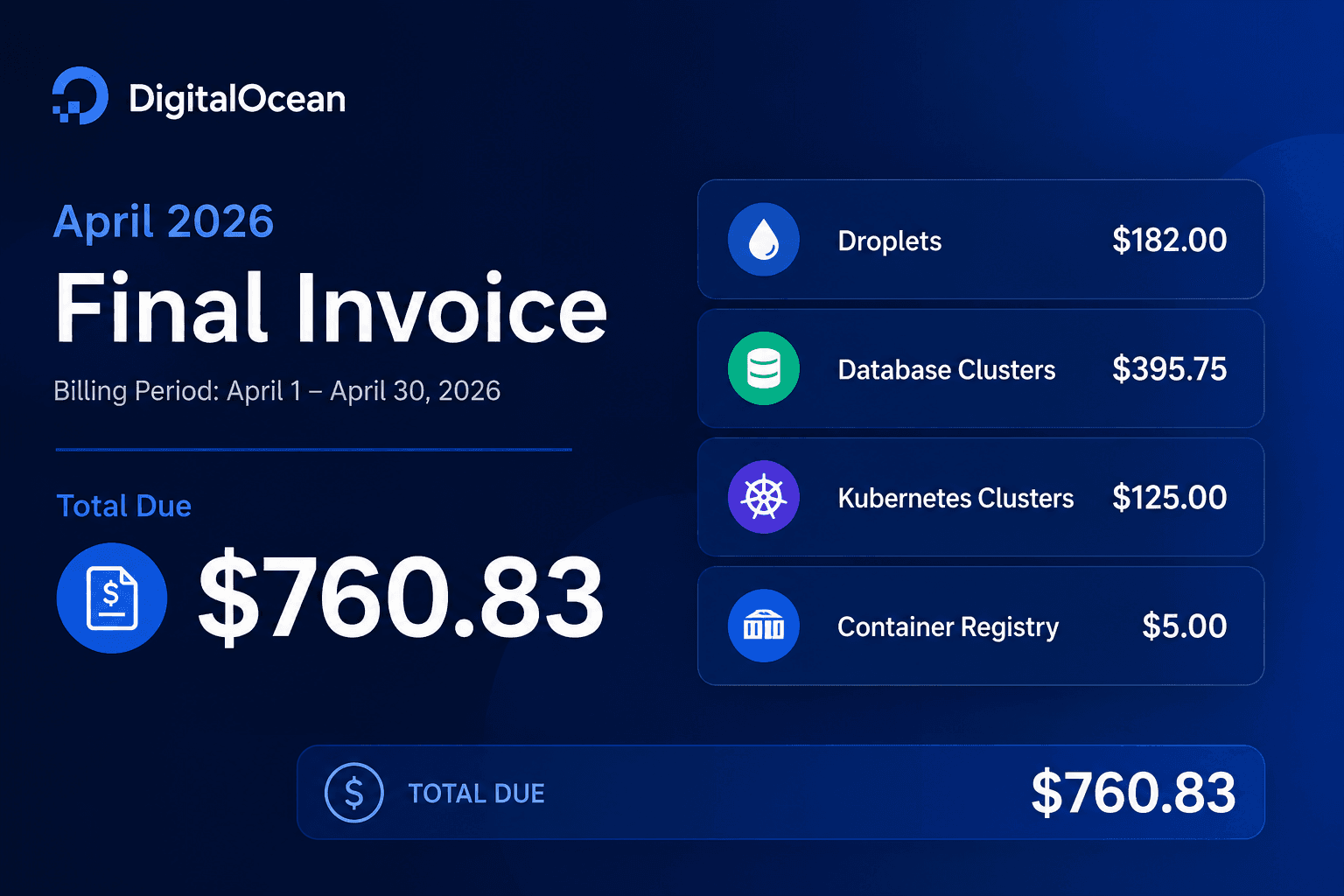
A friend asked me to audit his fintech's cloud spend a couple of weeks ago. They were on DigitalOcean, paying $760 a month, serving 2,000 daily active users on a small Go and Node stack. By the end of the weekend, the new infrastructure on AWS came out to about $170 a month. Around $590 saved every month. About $7,000 a year on a tiny stack.
There was no clever engineering involved. No re-architecture. No serverless rewrite. Most of the savings came from deleting things the team had set up two years ago and never circled back to.
This is a walkthrough of what was in their bill, what we did with each line item, and the two near-misses that made the migration worth doing carefully. The first was a $1,400 a month RDS preset that AWS politely tried to talk us into. The second was a database backup nobody had ever tested.
What was in the bill
The team's old DigitalOcean stack came to about $760 a month for an app serving 2,000 daily users. The managed Postgres alone was over $300, and it was running at under 10% CPU. The pattern is familiar to anyone who has been around startups for a while. You provision for the growth you hope for, and two years later you're still paying for capacity the load never showed up to use.
Here's what the bill broke down to, line by line.
The Vault droplet: $14 a month, storing zero secrets
Two years ago, someone on the team set up a self-hosted HashiCorp Vault server. Good instinct. Vault is the responsible-engineer-on-a-Tuesday choice for secrets management. The problem is they never finished wiring anything up to it.
The droplet had been running since 2024, billing $14 a month, storing zero secrets. $168 a year for a process that wasn't doing anything.
A Kubernetes cluster: $125 a month, never deployed to
Same story, more expensive. Somebody set up a managed Kubernetes cluster, presumably with the intent of moving the API workloads onto it. They never did. Two years later, the cluster was still ticking over at $125 a month with zero workloads ever deployed.
This was the single most painful line item to look at. Over $3,000 paid out for capacity nobody used.
The Postgres standby node: $94 a month
Their managed Postgres was running with a hot standby for high availability. The standby cost an extra $94 a month. The trouble is the team had no on-call rotation. If the primary went down at 3am, nobody on the team was awake to actually fail over to the standby. They were paying for an availability guarantee they couldn't cash in.
HA at this stage was a checkbox, not a capability.
The Postgres instance itself: managed premium, under 10% CPU
The managed Postgres was the single biggest line item, around $200 a month at this tier. Database utilization was sitting at under 10% CPU. Memory hovered around 40%. The team was paying the managed-database premium plus the standby plus a generous instance size to run a workload that fits comfortably on a fraction of that capacity.
There were a few smaller things on top of these. Container registry. Spaces (DO's S3 equivalent). Small stuff that wasn't worth touching.
What we did on AWS
The new infrastructure on AWS came out to about $170 a month. The shape of it:
- One EC2 instance,
t4g.large, running on Graviton (ARM). 20% cheaper than the equivalent x86 box for the same workload. - One RDS Postgres instance,
db.t4g.large, Single-AZ. Around $94 a month. Same hardware class as the EC2. - AWS Secrets Manager for the 4 secrets we actually needed, $1.60 a month instead of $14 for the unused Vault droplet.
- No Kubernetes. No standby node. No NAT Gateway (default VPC, public subnets, strict security groups).
- ECR for container images, costs pennies.
- Budget alerts, anomaly thresholds, and quota caps set up before any billable resource was provisioned.
Cost guardrails first, billable resources second. This matters more than people realize.
If an AWS access key ever leaks, the first thing an attacker does is spin up bitcoin miners across every region. Setting hard quota caps on EC2 and disabling Spot fleet provisioning entirely caps the blast radius. It is the kind of work that takes ten minutes and only ever matters once, but when it matters, it matters at six figures.
The trap we almost stepped on
When you create a Postgres instance in the AWS RDS console, there's an "Easy Create" option. It looks helpful. Three radio buttons: Dev/Test, Production, and Free Tier. The first time I went through it for this migration, I almost clicked Production. It sounded right. Production-grade fintech app, production-grade database, sure.
If we had clicked Production, AWS would have happily put us on db.r7g.xlarge with Multi-AZ enabled, 7-day backups, and Performance Insights on the paid tier. That comes out to about $1,400 a month for a workload running comfortably on under 10% CPU.
The button isn't lying. If you really are at scale, those are reasonable defaults. The lie is implicit. The console assumes that anyone clicking "Production" is at unicorn scale, and prices accordingly. Most startups clicking that button aren't, and end up paying $15,000 a year extra to find out.
We turned around and used the Standard Create flow. Picked db.t4g.large, Single-AZ, free Performance Insights (7-day retention is plenty for now), 7-day backups (still free by default). About $94 a month for the database tier. Same Postgres, same data, same write performance. The only thing we gave up was automatic Multi-AZ failover, which the team couldn't have used anyway.
The patterns AWS bakes into its console defaults are worth a separate post. For now, the lesson is simple. Do not click "Easy Create → Production" unless you know exactly what you are agreeing to.
The backup that almost cost everything
Halfway through the migration, the team's DigitalOcean account got terminated. I'm not going to go into why because it isn't my story to tell, but the result was that we lost access to the live database before we had finished the cutover. The new database on AWS wasn't fully populated. The old database was now on the other side of a wall.
This is the part where backups save you, or don't.
The team had a directory-format pg_dump from about 36 hours before termination. They had never restored it. Not once. The backup had been generated on a schedule for over a year, and nobody had ever pulled it down and run it through a pg_restore to see if it actually worked.
We got lucky. The dump worked. We restored it onto the new RDS instance, ran some smoke tests, and the data came back consistent. Anything written in the 36 hours between the dump and the termination was gone, but the core dataset was intact.
If the dump had been corrupted, or partial, or had been generated against a version mismatch that pg_restore refused to honor, the company would have lost everything. There is no version of "everything" that ends well for a fintech.
A backup you have never restored is a hope. You don't know if it's restorable until you try, and the time to try is not during an outage. Pick a recent backup tonight and restore it onto a scratch database. Run your smoke tests against the result. Schedule that drill as a recurring task. If you have never done this, what you have on disk is files you hope are backups.
The pattern I keep seeing
There is a thing I notice every time I audit a small startup's cloud bill. The big savings almost always live in the line items nobody has had time to question.
Engineers set up the Vault droplet because Vault was the responsible move for secrets. The Kubernetes cluster got provisioned because the team thought they would grow into it. The standby node got checked because it sounded like the safe thing. None of these were bad decisions when they were made. They just stopped being correct, and nobody on the team had been in a position to push back.
When founders see a high cloud bill and think they have a cost problem, they usually have a different problem. They have engineers who know how to use AWS, but they don't have anyone with the authority or the experience to say "we don't need this anymore." That is a senior engineer's job. Sometimes a CTO's. When neither role is filled, the cloud bill quietly becomes the running cost of the gap.
This isn't a knock on mid-level engineers. Building things is the job and they're great at it. Asking a mid-level IC to challenge an architectural choice that someone above their pay grade made two years ago isn't fair. It isn't their lane. The senior engineer's job, the one a lot of small startups try to skip, is precisely this. Reading the bill, asking what each line is for, and writing it down.
What to do this week
If you run a small startup, take an hour this week and open your cloud bill in detail. Go line by line. For each one, ask:
- What is this for?
- When did we provision it?
- Is anyone using it right now?
- Could we live without it for a week as a test?
If you cannot answer any of these for a given line, that is almost certainly where the money is. The Vault droplet I mentioned at the top of this post was billing $14 a month for two years. $336 total. Not a fortune, but if you have ten of those across your account, you're looking at $3,000 to $4,000 a year. Most small startups have ten.
And while you are in there, restore your most recent database backup onto a scratch database. Time how long it takes. Verify the row counts. Run your smoke tests against it. If anything goes wrong, fix that before anything else this week. Backups are a Schrödinger's cat problem until you open the box.